

If you’re about to start driving lessons or hire a car, someone has probably asked for your driving licence check code and you’re wondering what that even means. You’re not alone. Most people have never heard of it until they actually need it.
So here’s the quick answer: a driving licence check code is a unique, one-time code generated through the DVLA’s GOV.UK website. It lets a third party like a driving instructor, employer, or car rental company view your driving record online, including your entitlements, penalty points, and any disqualifications. In this guide, we’ll walk through exactly what it is, why it matters, how to get one, and what the person checking it can actually see.
Driving Licence Codes and Categories Explained
Before getting into the check code specifically, it helps to understand how a UK driving licence works because there are actually two types of “codes” that confuse a lot of people.
What Are Driving Licence Codes and Categories?
Your UK photocard driving licence contains two distinct types of information on the back:
Driving licence categories are shown as letters or a combination of letters and numbers like “B” for a standard car or “A” for a motorbike. These tell you which types of vehicles you’re legally allowed to drive.
Driving licence codes are shown as numbers like “01” (which means you must wear glasses or contact lenses when driving). These tell you the conditions or restrictions that apply to your driving entitlement.
What’s the Difference Between a Check Code and a Share Code?
People frequently trip over this, so let’s address it now.
A share code and a driving license check code are interchangeable. The identical code that you generate on GOV.UK is referred to by both terms in the DVLA. You create a check code when you “share” your license information. It is used to “check” your record by the recipient. Two names, same code.
A “paper counterpart” that was eliminated in 2015 is mentioned in some older internet resources. Since then, disqualifications and penalty points have only been recorded digitally, which is precisely why the check code system is in place.
Why Do You Need a Driving Licence Check Code?
A driving licence check code is needed any time a third party must legally verify your driving record. This includes your driving instructor before your first lesson, an employer checking your licence for work purposes, or a car hire company confirming you hold a valid entitlement before handing over the keys.
Here’s a breakdown of who typically asks for it and why:
For Learner Drivers (Before Your First Lesson)
Your driving instructor is legally obligated to confirm your entitlement to drive before teaching you. This isn’t optional. Without this check, any insurance covering the lesson could be invalid for both you and your instructor.
Before your first lesson with Pharez Driving School (or any instructor), you’ll need to generate this code and share it along with the last 8 digits of your driving licence number.
For Employers and HR Teams
Many jobs require a clean or near-clean driving record, delivery drivers, sales reps, company car users. Employers use the licence check code to run a formal licence verification UK check before hiring or insuring drivers on company vehicles.
For Car Rental Companies
Car hire companies cannot legally hand over a vehicle without checking your driving entitlement. The check code system replaced the old paper counterpart system for exactly this purpose. They use it to confirm you hold the right licence category (manual or automatic), check for recent disqualifications, and verify penalty points online.
For Driving Instructors
Beyond learner drivers, approved driving instructors (ADIs) also use the check code for pupils taking refresher courses or intensive lessons. The code confirms that a full or provisional licence is genuinely valid and active.
How to Share Your Driving Licence Details
Sharing your driver details used to involve carrying around an easily torn piece of green paper alongside your plastic card. The modern digital counterpart system makes this process completely electronic, faster, and highly secure.
Historical Context: On 8 June 2015, the Driver and Vehicle Licensing Agency (DVLA) officially abolished the paper counterpart driving licence. Since that date, all live endorsements, penalty points online, and driving bans are stored strictly inside the central DVLA online services database.
Because the paper counterpart driving licence no longer exists, you must use the online service to generate a driver check code whenever someone requires your official history. This protects your identity by letting you choose exactly when and with whom you share your records.
What Information Does the Check Code Reveal?

When you pass an 8-character check code to a company, they do not gain unrestricted access to your life. The DVLA limits the digital readout to specific data points required for corporate insurance and legal checks.
The Authorized Digital Readout
- Core Personal Details: Your official first name, surname, and registered home address.
- Vehicle Entitlements: A clear list of every vehicle category you are allowed to drive, including automatic or manual restrictions.
- Active Endorsements: Any active penalty points online, traffic offenses, or current driving disqualification check results.
- Licence Status: Confirmation that the photocard is active, expired, or currently suspended.
This system ensures that private information, like your National Insurance number, remains completely hidden from the person checking your record
How to Get Your DVLA Driving Licence Check Code (Step-by-Step)
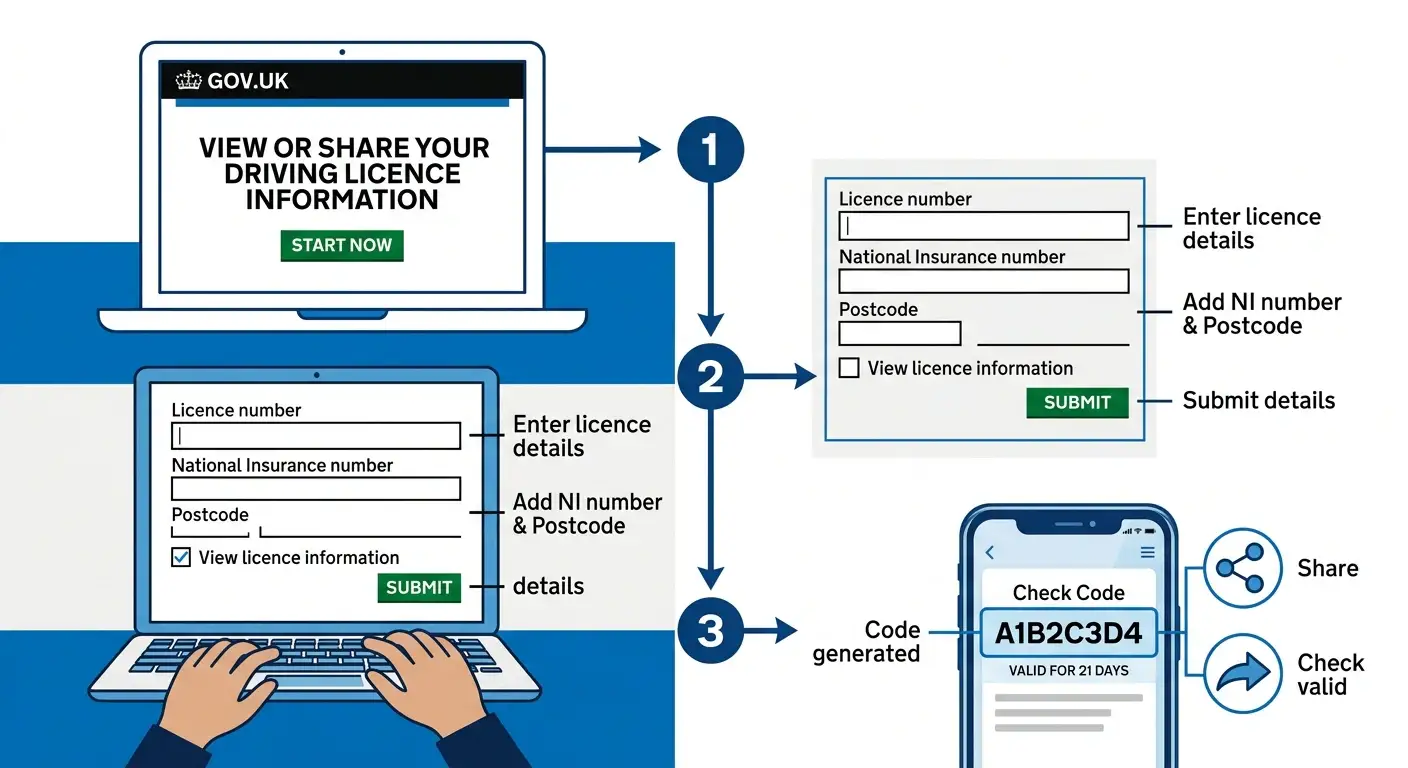
To get your driving licence check code, visit the GOV.UK “Share Driving Licence” page and enter three pieces of information: your driving licence number, your National Insurance number, and the postcode on your driving licence. The process takes less than two minutes.
Generating your code takes less than two minutes if you gather your documents before starting. Follow this straightforward process to get your code through the official government portal.
What to Gather Before You Start
- Your physical photocard driving licence
- Your National Insurance number
- The exact postcode listed on your driving licence
The Generation Step Sequence
1.Access the Official Government Portal:Takes 30 seconds.
Open your web browser and search for the official page: “View or share your driving licence information” on GOV.UK. Click the green “Start Now” button.
2.Enter Your Personal Identification Details:Requires accuracy.
Carefully type in your 16-character driving licence number, your National Insurance number, and your home postcode. Check the privacy agreement box and click submit.
3.Navigate to the Sharing Tab:Locate the correct screen.
Once your driver dashboard loads, look at the tabs along the top of the page. Click the tab explicitly labeled “Share your licence information.”
4.Generate and Save Your Secure Code:Single-use token created.
Click the green button that says “Get a code.” An 8-character, case-sensitive code will instantly display on your screen. Write this down or click “Print/Save a summary” to keep a copy.
Once generated, give this 8-character script to the requesting agent along with the last eight characters of your driving licence number so they can complete their verification.
How to Generate the Code on Your Phone
The GOV.UK website is fully mobile-responsive, so you can generate your licence check code directly from your phone. Open your mobile browser, navigate to gov.uk/share-driving-licence, and follow the same steps above. There’s no app needed it works just as well on mobile as on desktop.
How Long Is a Driving Licence Check Code Valid?
Your driving licence check code is valid for 21 days from the moment you generate it. After 21 days, the code expires automatically even if it hasn’t been used. If that happens, simply generate a new one through the same GOV.UK process.
What Happens When the Code Expires?
Nothing negative happens to your licence if the code expires. It just becomes unusable. The 21-day window is a security measure to protect your personal driving data. If your instructor or employer hasn’t used it within that window, they’ll need to ask you to generate a fresh code.
Can You Generate Multiple Codes?
Yes. There’s no limit on how many times you can generate a code for checking driving licence details. If your previous code was used or has expired, just return to the GOV.UK page and generate a new one. Each new code is completely independent and replaces any previous one.
Is It Safe to Share Your Driving Licence Check Code?
Yes, it’s safe to share your driving licence check code but only with people or organisations who have a legitimate reason to check it. The code does not give access to your address, bank details, or National Insurance number. It’s specifically designed for secure, one-time sharing of your driving record.
A few sensible steps to follow:
- Only share the code with your actual driving instructor, verified employer, or official car hire company
- Never post your check code publicly on social media or in open group messages
- If you’re unsure who’s asking for it, contact the organisation directly to verify the request before sharing
- Remember: each code is single-use, so once it’s been checked, it can’t be misused again by the same person
The DVLA’s system is built with your data security in mind. The 21-day expiry and single-use rule exist specifically to prevent unauthorised access.
Common Problems and How to Fix Them
My Details Won’t Match on the GOV.UK Website
This typically occurs when the address DVLA currently has on file differs from the postcode you enter. There will be a discrepancy if you recently moved and haven’t renewed your license with the DVLA.
To fix it, try generating the code again after correcting your address via gov.uk/change-address-driving-licence. After a modification, DVLA records may take several days to update.
My Instructor Says the Code Doesn’t Work
The most common reason is that the code has either expired or already been used. Generate a fresh code and resend it. If the problem continues, confirm that you’re also sending the last 8 digits of your driving licence number the check code alone isn’t enough to complete the check.
I Can’t Load the GOV.UK Website
The GOV.UK share driving licence page doesn’t require a login account it only asks for your licence details directly. If the page isn’t loading, try a different browser or clear your cache. If GOV.UK itself is experiencing issues (rare), check the service status at status.publishing.service.gov.uk.
My Driving Licence Number Doesn’t Seem to Work
UK driving licence numbers follow a specific 16-character format. Double-check you’re entering it correctly including any zeros (the digit 0, not the letter O). The number is found in field 5 on the front of your photocard driving licence.
Pricing Packages at Pharez Driving School
Now that you know how to generate your check code, you’re one step closer to getting behind the wheel. At Pharez Driving School, we offer flexible driving lesson packages across London designed for complete beginners through to test-ready drivers.
Whether you’re booking your first lesson or need an intensive course before your test, our instructors will guide you through the check my licence process before your first session so there are no delays on the day.
Final Thoughts
Getting your driving licence check code is a quick and simple process once you know what it is and where to go. The whole thing takes under two minutes on GOV.UK, and it’s a legal requirement before your first driving lesson in the UK.
If you’re ready to start learning to drive in London, get in touch with us at . Our instructors are on hand to help you through every step of the process including making sure your check licence details are sorted before lesson one.
FAQs
What is a driving licence check code?
A driving licence check code is a unique, one-time code generated through the GOV.UK website. It allows a third party such as a driving instructor, employer, or car rental company to view your driving record, including your entitlements, penalty points, and any disqualifications held by the DVLA.
How do I get a DVLA driving licence check code?
Visit gov.uk/share-driving-licence, enter your driving licence number, National Insurance number, and postcode. Click “Share licence information” to generate your code. It’s valid for 21 days and is single-use only.
How long does a driving licence check code last?
The code is valid for 21 days from the date it’s generated. Once expired, you can generate a new one at any time through the same GOV.UK page. There’s no limit on how many times you can generate a fresh code.
Can I use the same check code twice?
No. Each code is single-use. Once it’s been used by your instructor or employer, it’s no longer valid. If someone needs to check your licence again, you’ll need to generate a fresh code.
What happens if I don’t provide my check code before my driving lesson?
Your instructor is entitled to cancel or refuse the lesson. Without a valid driving entitlement check, the insurance covering the lesson may be invalid creating a legal risk for both you and your instructor.
Does the check code show my home address?
No. The check code only reveals your driving entitlements, penalty points, endorsements, disqualifications, and licence restrictions. Your personal address and financial details are not visible to the person checking.
Do I need a check code for car hire?
Yes. Most UK car rental companies require you to generate a check licence code before collecting a vehicle. This is part of the standard licence verification UK process that replaced the old paper counterpart system in 2015.
What’s the difference between a check code and a share code?
They’re the same thing. The DVLA uses both terms for the same code you generate on GOV.UK. When you “share” your driving licence details, you generate a “check” code. The terminology varies by context but the code serves one purpose: giving a third party single-use access to your DVLA record.
